
WhatsApp task management means the task itself lives in a WhatsApp message with an owner, a deadline and a Done button, not in a group chat that scrolls away. The owner types one line ("Kiran, Bhavnagar dispatch ka packing list aaj 5 baje tak bhejo"), confirms what Fixo read, the staff member gets a task card on their own WhatsApp, taps Acknowledge, gets an alert at the deadline (and a reminder before it on paid plans), and the owner is told when it is overdue. No app to install, no training, and a web dashboard that shows every task and who is on time. This article explains how that works in practice for a small business in India, and where it does not.
Why do tasks get lost in WhatsApp groups?
Most Indian businesses already run on WhatsApp. The problem is not the channel; it is the group. A group message has none of the four things a task needs:
- An owner. "Someone please send the packing list" is read by eight people and done by nobody.
- A deadline. "Jaldi karo" is not a time. Without a time, there is nothing to be late against.
- A state. A group has no "done". The only signal is a reply, if anyone replies.
- A record. By evening, the task has scrolled 200 messages up under photos, forwards and "ok".
So the owner keeps the real list in their head and does the follow-up by phone. That is the daily "maine bola tha, usne kiya nahi" problem, and it is a system problem, not a staff problem.
What does a task need to have?
A task is a message that carries all four: who, what, by when, and a way to say it is done. When the message has those, it can be tracked without anyone opening a spreadsheet. This is the whole idea behind WhatsApp-native task management: keep WhatsApp, but turn the instruction into a task card instead of a line in a group.
| Task in a group chat | Task card in WhatsApp | |
|---|---|---|
| Who does it | Whoever notices, or nobody | One named assignee (or a named list of people) |
| Deadline | Implied, argued about later | Set when the task is created, visible on the card |
| Seen or not | Blue ticks, if you check | Assignee taps Acknowledge, Not sure or More time |
| Reminder | The owner, by phone | Deadline alert on every plan; advance reminder to the assignee on paid plans, once switched on |
| Overdue | Discovered when the customer calls | Overdue alert to the owner and assignee (Professional and Business), with the assignee's reason if given |
| Done | "Ho gaya" somewhere in the scroll | Tap Done on the reminder or tick it in TASKS; photo proof on paid plans |
| Record | Search the group, hope | Every task on the web dashboard, searchable and filterable |
How does WhatsApp task management work?
The loop has six stages. Here it is with a small packaging unit in Surat: Nilesh owns it, Kiran handles dispatch, and Fixo is a saved number on Nilesh's WhatsApp.
📋 Bhavnagar dispatch ka packing list bhejo
👤 Assigned: Kiran
⏰ Deadline: Today, 5:00 PM✅ Correct✏️ Edit❌ Cancel11:42 AM
📋 Bhavnagar dispatch ka packing list bhejo
⏰ Due: Today, 5:00 PM👀 Acknowledge❓ Not sure⏰ More time11:43 AM
- Assign. The owner sends one line that says who, what and by when, typed or (on paid plans) as a voice note, in English, Hindi or Hinglish.
- Confirm. Fixo shows back what it understood. Nothing reaches the staff member until the owner taps Correct; Edit fixes a wrong name or time first.
- Acknowledge. The staff member gets the task card in their own WhatsApp chat and taps Acknowledge, Not sure (with a reason) or More time. The owner learns early whether the task was seen and understood.
- Remind. The reminder goes to the staff member, not to the owner: an advance reminder on paid plans once switched on, and a deadline alert with a Done button on every plan.
- Escalate. If the task is still open after the deadline, the owner gets an overdue alert (Professional and Business), with the reason if the staff member gave one.
- Close and record. The staff member taps Done, optionally with a photo as proof on paid plans, and the task stays on the dashboard with its history.
The exact message formats, what happens when you leave out a time, and how to give one task to several people are in how to assign tasks to employees on WhatsApp. What the loop looks like across a working day, from the morning digest to the weekly summary, is in staff not completing tasks on time.
Where does a web dashboard fit in?
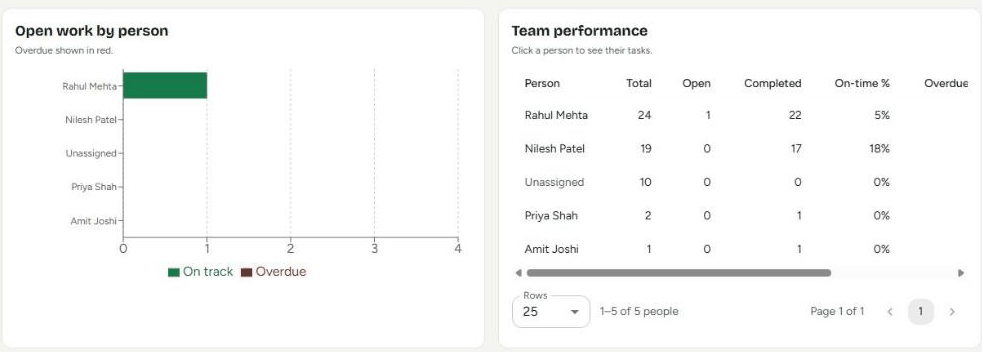
WhatsApp is where the work happens; the dashboard is where the owner looks when they want the whole picture. The Fixo dashboard at myaccount.getfixo.app lists every task, with search across title, description and assignee, and filters by status, assignee, created-by, priority, repeats, overdue-only and three date ranges. A Team Performance view shows, per member, the total, open, completed, cancelled, overdue-now and on-time counts. It installs on a phone home screen as a web app, so the owner does not need a laptop to check it.
In practice this is what changes the conversation with a repeatedly late staff member. Instead of "you are always late", the owner has "in September you had 41 tasks, 9 went overdue, here they are". That is accountability with a record, not with memory.
What does Fixo not do?
Is it worth it for a 5-person business?
The test is simple: count how many follow-up calls or "ho gaya?" messages you send in a day. If the answer is more than two or three, the work of remembering is already costing you an hour a day. A task card costs one message. Fixo has a Free plan with a monthly task cap, so a small team can run the loop for a month before paying anything, and paid plans are flat per business rather than per user, with unlimited members from the Starter plan. Prices and plan limits are on the pricing page.
Frequently asked questions
Do my staff need to install an app?
No. The task card arrives on the staff member's own WhatsApp. There is no app, no account, no login and no training. They tap Acknowledge, Not sure or More time on the card, and tap Done on the deadline alert (or send TASKS and tick it) when finished.
Does it work in Hindi or Hinglish?
Yes. You can send the task in English, Hindi or Hinglish, as text or (on paid plans) as a voice note. Fixo replies in English, Hindi or Hinglish. A message typed in another Indian language, such as Gujarati, still becomes a task, with the title kept in that language.
What happens when a deadline passes?
Both of you get a deadline alert at the deadline, on every plan. On Professional and Business, if the task is still open after the time you set, you and the staff member get an overdue alert, and if they had asked for more time or flagged a problem, you already have that reason. The pricing page lists what each plan includes.
Can I see everything in one place?
Yes. The web dashboard at myaccount.getfixo.app shows every task, with search across title, description and assignee, and filters by status, assignee, created-by, priority, repeats, overdue-only and date range. Team Performance shows each member's total, open, completed, cancelled, overdue-now and on-time counts. It can be installed on a phone home screen.
Is there a free plan?
Yes. Fixo has a Free plan for teams and a Solo Free plan for one person, each with a monthly task cap. Paid plans are priced flat per business, not per user, and unlimited team members are included from the Starter plan. See the pricing page for current details.