
When staff are not completing tasks on time, the cause is usually not the staff. It is the instruction: it had no clear owner, no written deadline, and no reminder, so it lived in someone's memory until it was late. The fix is a system that does three things without you: puts each task in writing with one owner and a time, reminds that person before and at the deadline, and tells you the moment it slips, with their reason. Then you track who is on time with numbers, not with memory, and the daily follow-up calls stop.
Why do staff miss deadlines?
Look at the last five tasks that were late in your business and ask where each one broke. Almost every late task fails at one of three points:
- The instruction was not clear. "Stock statement bhej dena" said at the counter, to two people, with no time. Each one assumed the other would do it, or that "today" meant the end of the day.
- Nobody reminded them. The person meant to do it, then a customer walked in, then a delivery came, and by 7 PM it was gone. The only reminder system was you, and you were busy too.
- Nobody noticed it was late. The deadline passed quietly. You found out when the distributor called, two days later, and by then the reason ("the rate list was not updated") was lost.
None of these is about effort or attitude. They are gaps in how the work was handed over. Fix the gaps and most "late staff" problems disappear; the few that remain are now visible, with data, which is a much easier conversation.
What does system-driven follow-up look like during a day?
Here is a pharma distribution office in Indore with nine staff. Sanjay owns it; Rekha handles accounts, Imran does deliveries, Tushar runs the godown. Sanjay is on the Professional plan, has switched reminders on (1 hour before, 1 hour after), and assigns work to Fixo on WhatsApp instead of at the counter.
| Time | What happens | Who gets it | Plan |
|---|---|---|---|
| 8:30 AM | Morning digest: overdue tasks, tasks due today, upcoming tasks, with a View Tasks button | Sanjay; each staff member gets their own on days they have open tasks | Daily on paid plans |
| 10:05 AM | Sanjay types a task; Fixo shows it back; he taps Correct; the card reaches Rekha | Rekha | All plans |
| 10:12 AM | Rekha taps Acknowledge | Sanjay can see it has been seen | All plans |
| 3:00 PM | Advance reminder, 1 hour before the deadline | Rekha | Solo Pro, Starter, Professional, Business (once switched on) |
| 4:00 PM | Deadline alert with Done and Reject buttons | Rekha and Sanjay | All plans |
| 5:00 PM | Overdue alert, if the task is still open | Sanjay and Rekha | Professional, Business |
| Monday 9:00 AM | Weekly summary: completed, pending, overdue, completion rate | Owner, co-owners, staff with at least 3 tasks | Professional, Business |
This is what it looks like on Sanjay's phone when he assigns the task:
📋 Vijay Nagar distributor ko September ka stock statement bhejo
👤 Assigned: Rekha
⏰ Deadline: Today, 4:00 PM✅ Correct✏️ Edit❌ Cancel10:05 AM
📋 Vijay Nagar distributor ko September ka stock statement bhejo
⏰ Today, 4:00 PM
🔔 Reminders scheduled: 3:00 PM — Reminder to Rekha · 4:00 PM — Deadline notification · 5:00 PM — Overdue alert if not completed10:05 AM
Sanjay does nothing else for this task. If Rekha finds the rate list is not updated, she taps Not sure on the card, picks "Need more info", and types "rate list abhi update nahi hua". Sanjay sees that at 11 AM, not at 5 PM, and fixes it while there is still time. If she needs until tomorrow, she taps More time, asks for a day, and Sanjay approves, rejects or sets a new deadline.
How do I know who is late most often?
Stop relying on the feeling that "Imran is always late". Open the web dashboard at myaccount.getfixo.app and look at three things:
- Tiles at the top: Overdue, Due today, Completion rate and On time %, for the period you pick (This week, Last 7 days, This month, Last 30 days, or custom). Every figure is compared with the previous period, so you can see whether things are improving.
- Needs your attention: tasks waiting for your confirmation, questions from staff (Not sure), requests for more time, and tasks with nobody assigned. Most "late" tasks show up here first, before they are late.
- Team performance: for each person, total, open, completed, on-time %, overdue now and completion rate. Click a name to see exactly which tasks they have.
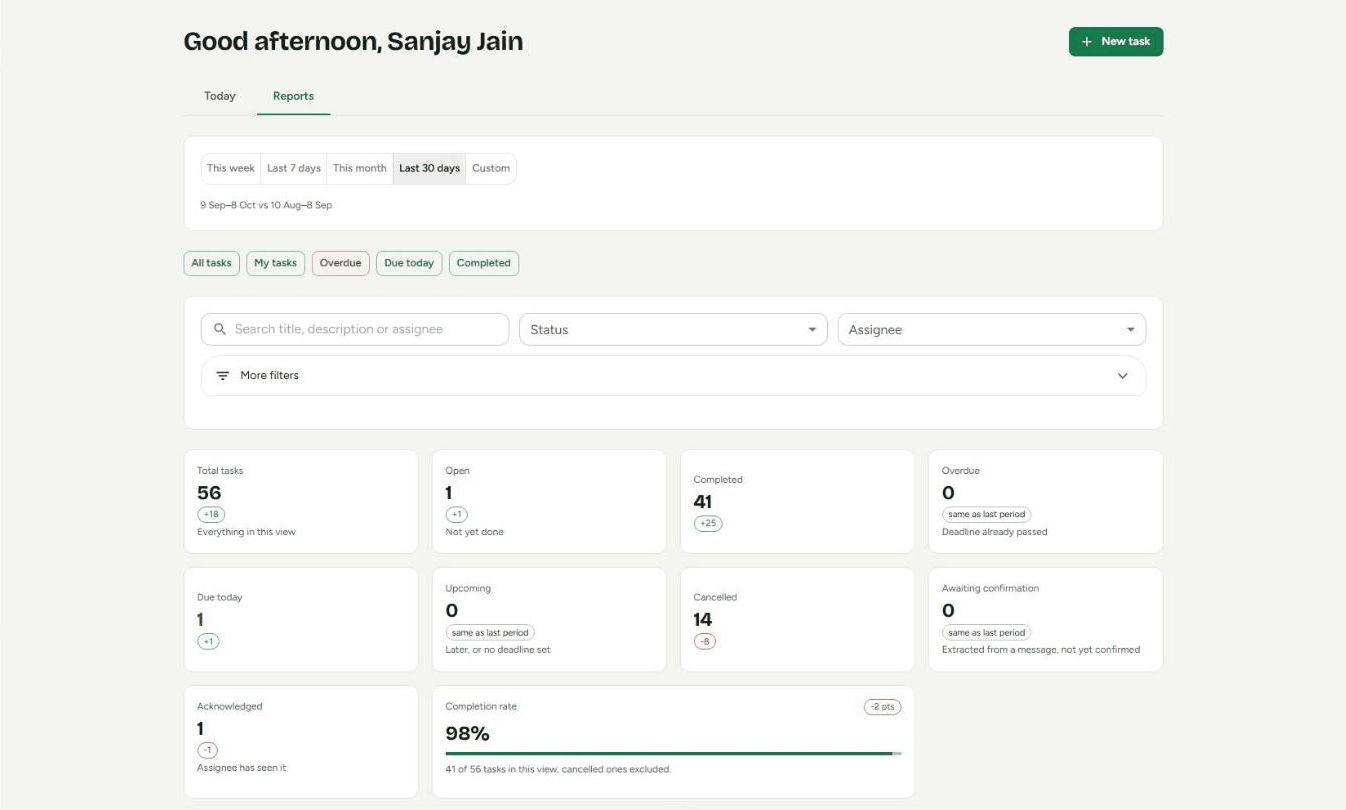
A useful habit is a three-minute check after the morning digest: open the dashboard, look at Overdue and Needs your attention, and deal with those first. The rest of the team's work is running on reminders and does not need you.
How should I talk to a staff member who is always late?
Once the tasks are in writing, a repeatedly late person is a pattern you can show, not an accusation. A fair conversation takes ten minutes:
- Bring the list, not the adjective. Open their name in Team performance and filter to overdue. "In the last 30 days you had 22 tasks and 7 went overdue; here they are" is specific, and it is the same record they see.
- Read the reasons together. Check which late tasks had a Not sure or a More time request before the deadline and which slipped silently. The first group is a workload or clarity problem; the second is a habit.
- Look for a shared cause. If most of the late tasks are one type (for example, anything needing a rate from the supplier), the fix may be upstream, not with the person.
- Agree one change. "Tap More time as soon as you know you can't make it" is enough for most people. Smaller tasks with nearer deadlines work better than one big task due on Friday.
- Look again in two weeks. The on-time % either moves or it does not. Either way, the next conversation has data too.
The numbers in step 1 are an illustration, not a benchmark. Every business has its own normal; what matters is the direction for each person over time.
What if someone does good work but keeps missing deadlines?
This is the hardest case, because the work is worth waiting for and nobody wants to lose the person. The fix is to separate two questions that usually get mixed up: is the work good? and was I told in time? Most owners can live with a task that takes an extra day. What damages trust is finding out on the day it was due.
- Check who set the deadline. If you set every deadline and this person always overruns, your estimates for their kind of work may simply be wrong. Next time ask "kab tak ho jayega?" and use their answer as the deadline. People keep dates they chose more often than dates they were given.
- Look at where the time goes. Good, slow work often means the person is redoing details nobody asked for. Say what "done" looks like before they start: which parts matter to the customer and which do not.
- Break big tasks into checkpoints. "Quotation draft by 2 PM, final by 5 PM" gives you a signal at 2 PM instead of a surprise at 5.
- Agree one rule: tell me before, not after. Asking for more time at 11 AM is fine; saying nothing until 5 PM is not. That rule protects their good work instead of punishing it.
In Fixo, the second and fourth points are built into the card. The owner can use Edit before confirming to put in the date the person suggested, and the person can tap More time the moment they know, with a reason, which the owner approves or changes. Over a month, Team performance shows whether their on-time % moves once the dates are theirs.
Will staff feel watched?
They will feel reminded, which is different. Fixo sees tasks and nothing else: no location, no working hours, no screen time, no attendance. The staff member sees exactly what the owner sees about their own task, can ask questions or more time on the card, and gets their own morning digest. In most small teams the first reaction is relief: the instruction is written down, so there is no argument later about what was said.
What should I set up in the first week?
- Add your staff (send 5 to Fixo) and tell them to reply HI to the invitation.
- Switch reminders on. They are off until you do: send 7 to Fixo and tap Open Profile, or on the dashboard open Profile → Reminders. Pick a "before" time and, on Professional or Business, an "after" time.
- Put a time on every task. "Aaj 4 baje tak" instead of "aaj". A task without a time defaults to your closing time, which is often later than you meant.
- One task per message. Two jobs in one line become one task with one Done.
- Stop assigning at the counter. If you say it out loud, also send it to Fixo, or it is outside the system.
- Check the dashboard once a day after the morning digest, and look at Team performance once a week.
For the exact message formats, see how to assign tasks to employees on WhatsApp.
What does Fixo not do?
Frequently asked questions
How do I know which staff member is late most often?
Open Team performance on the Fixo web dashboard. For each person it shows total, open and completed tasks, on-time percentage, overdue now and completion rate, for the period you choose. Click a name to see that person's tasks, and use the Overdue view to see exactly which ones slipped.
Will my staff feel monitored?
Fixo tracks tasks, not people. It does not record location, working hours, screen time or attendance. Staff see the same task, deadline and reminders you see, and they can say Not sure or ask for More time on the card, so a late task comes with their side of the story.
Does it work for field staff who are out all day?
Yes. Everything happens in their normal WhatsApp, so a delivery person or site supervisor can acknowledge, ask for more time or mark a task done from their phone in a few seconds, without logging in anywhere. On paid plans they can reply to the task card with a photo as proof.
What if a task is late for a genuine reason?
That is what More time and Not sure are for. The staff member asks for extra hours or days, or flags a problem with a reason, before the deadline. You approve, reject or set a new deadline. A task that slipped with a reason given in advance is a different conversation from one that slipped in silence, and the record shows which it was.