
To assign tasks to employees on WhatsApp, type one line to Fixo that says who, what and by when ("Farhan, Satellite site ka measurement kal 11 baje tak bhej do"), check the task Fixo shows back to you, and tap Correct. The employee gets a task card on their own WhatsApp with Acknowledge, Not sure and More time buttons, and a deadline alert with a Done button when it is due; paid plans add a reminder before the deadline and, on Professional and Business, an overdue alert to you. No app for the employee, no training, and it works in English, Hindi or Hinglish, typed or as a voice note.
What does a task message need to contain?
Three things: who should do it, what they should do, and by when. Write it the way you would say it to the person. All of these work:
- "Pooja, send the revised quotation to the Bopal client by 4pm"
- "Farhan ko bolo Satellite site ka measurement kal 11 baje tak bhej de"
- "Ask Pooja to confirm the marble sample delivery before Friday"
- "Pay the electrician tomorrow" (no name, so the task is for you)
For anything more than a one-line job, add a fourth thing in the description: what "done" looks like ("measurement with photos of all four walls", "quotation in the new format, PDF"). It is the part owners most often leave in their head, and the usual reason a task comes back half-finished.
More on handing over work so it does not come back to you: how to delegate work so it doesn't come back to you.
A first name is enough. "Poojaji" or "Farhan bhai" also work, and you can use a phone number instead of a name. Two rules save most confusion: one task per message (two different tasks need two messages), and the person named must already be on your team.
How do I assign tasks to employees on WhatsApp by text, step by step?
The example below is an interior design firm in Ahmedabad. Devang runs it; Farhan does site work; Pooja handles quotations. Devang has saved Fixo's number, both of them have accepted their team invitations, and Devang is on the Professional plan with advance and overdue reminders switched on (send 7 to Fixo, or Profile → Reminders on the dashboard; they are off until an owner turns them on).
Step 1: add the employee to your team (once)
Send 5 to Fixo, enter the person's full name, WhatsApp number and role (Staff or Co-owner), and save. Fixo sends them an invitation on WhatsApp; they accept by tapping the button or replying HI. Until they accept, a task cannot reach them, and Fixo tells you so. A quick "Fixo se WhatsApp aayega, HI reply kar dena" to the person before you add them saves the follow-up. You can also share their contact card with Fixo, or add them on the web dashboard under Team.
Step 2: type the task
📋 Satellite site ka measurement bhej do
👤 Assigned: Farhan
⏰ Deadline: Tomorrow, 11:00 AM✅ Correct✏️ Edit❌ Cancel6:12 PM
Step 3: confirm, edit or cancel
Nothing is sent to Farhan yet. ✅ Correct sends it. ✏️ Edit opens a short form where you can change the description, the person or the deadline before sending. ❌ Cancel drops it; nothing is created. A task you never confirm is cleared after 24 hours and does not count towards your plan.
📋 Satellite site ka measurement bhej do
⏰ Tomorrow, 11:00 AM
🔔 Reminders scheduled: 10:30 AM — Reminder to Farhan · 11:00 AM — Deadline notification · 12:00 PM — Overdue alert if not completed6:13 PM
Step 4: the employee gets the card
📋 Satellite site ka measurement bhej do
⏰ Due: Tomorrow, 11:00 AM👀 Acknowledge❓ Not sure⏰ More time6:13 PM
Farhan taps Acknowledge, and Devang knows the task has been seen. If something is unclear, Farhan taps Not sure, picks a reason (not my task, need more info, already done, unavailable today, I have a question), adds a note and sends it to Devang. If he cannot make the time, More time lets him ask for extra hours or days; Devang approves, rejects or sets a new deadline, and Farhan is told.
Step 5: reminder, done, or overdue
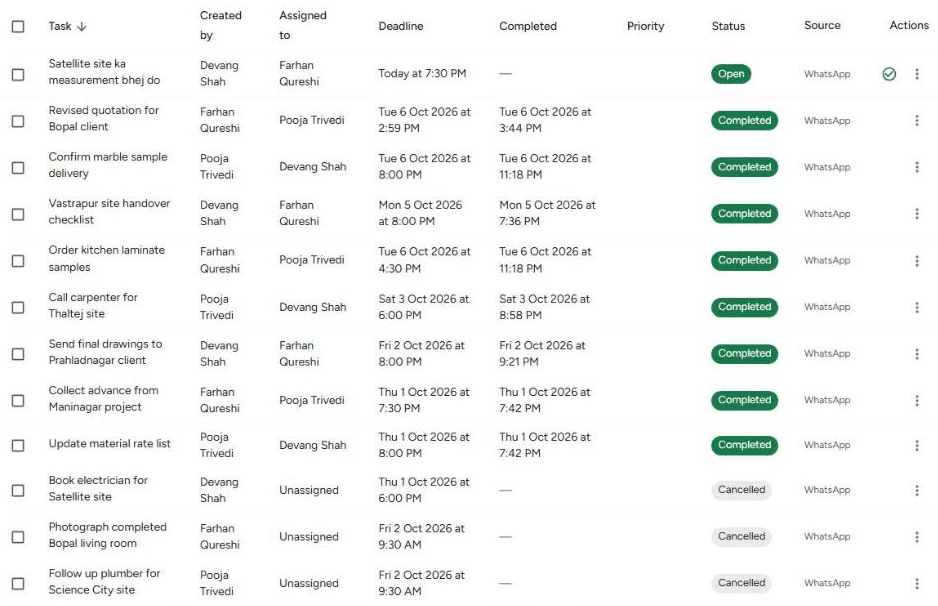
At 10:30 AM Farhan gets the advance reminder (Solo Pro, Starter, Professional and Business, once switched on). At 11:00 AM both of them get the deadline alert with Done and Reject buttons; that one is on every plan. He can also mark it done any time by sending TASKS or 1, ticking the task and tapping Mark as Done. If the task is still open at 12:00 PM, Devang and Farhan get the overdue alert (Professional and Business; see the pricing page). Everything, including who acknowledged and who is overdue, is on the web dashboard.
How do I assign a task by voice note?
On paid plans, hold the mic and say it: "Pooja ko bolo Bopal client ka revised quotation aaj 4 baje tak bhej de". Fixo replies that it is processing the voice message, shows what it heard, and then shows the task to confirm, the same Correct / Edit / Cancel step as above. Voice is the fastest way to assign from a site or a car, and it keeps the task title in the language you spoke.
How do I assign one task to several people or a whole team?
Name everyone in one message: "Farhan and Pooja, Vastrapur site handover checklist by Saturday 5pm". Fixo shows "Creating 2 tasks" to confirm, and after Correct each person gets their own card with their own reminders, so each one is tracked separately.
Name up to five people in one message. Your plan decides how many one task can go to: 1 on Free, 3 on Starter, 10 on Professional, unlimited on Business. If you name more than your plan allows, the task is created for as many as the plan allows and Fixo tells you who was left out. For a set of people you message often, create a group once and send @sitecrew followed by the task; Fixo sends one card to each member of the group.
What happens if I don't give a time?
Fixo understands everyday words such as kal, parso, shaam, 5 baje, Friday and next week. If the time is missing, it fills in a sensible default rather than leaving the task open-ended:
| You write | Deadline Fixo sets |
|---|---|
| No deadline at all | Today at your closing time (7:00 PM if you have not set working hours); if that has passed, tomorrow |
| A day without a time ("kal", "Friday") | That day at your closing time, or 7:00 PM |
| "now", "abhi", "turant", "urgent", "asap" with no time | 30 minutes from now, and the task is marked Urgent |
| "this week" | Saturday 5:00 PM this week |
| "next week" | Saturday 5:00 PM next week |
| A time already in the past | Fixo asks you for a future date and time |
Words such as urgent, asap, immediately, jaldi, turant or fatafat mark the task 🔴 Urgent; it shows in red and is listed first everywhere.
What are the common mistakes when assigning on WhatsApp?
- No deadline. "Farhan, measurement bhej dena" becomes a task due today at closing time. If that is not what you meant, say the day and time.
- Two tasks in one message. "Pooja, quotation bhejo aur supplier ko call karo" is one task to Fixo. Send two messages and each gets its own card, reminder and Done.
- Naming the wrong person. "Rahul ko invoice bhejo" stays with you, because Rahul is the person receiving the invoice, not the one doing the work. Say who should do it: "Pooja, Rahul ko invoice bhejo".
- Person not on the team yet. Fixo keeps the task for you and asks you to add them. Add them with 5 and wait for their HI.
- Tapping Correct without reading. The confirm card exists so you can catch a wrong name or time before it reaches anyone. Read the three lines.
- Assigning inside a WhatsApp group. Fixo does not read groups. Send the task to Fixo in your one-to-one chat; use @group to reach several people.
What does Fixo not do here?
Frequently asked questions
Can I assign a task by voice note?
Yes, on paid plans. Hold the mic and say the task the way you would say it to the person, in English, Hindi or Hinglish. Fixo shows what it heard and then the task to confirm, exactly as for a typed message.
Can I assign one task to 5 people at once?
You can name up to five people in one message. Your plan decides how many one task can go to: 1 on Free, 3 on Starter, 10 on Professional, unlimited on Business. Each person gets their own copy with their own reminders. For a team you message often, create a group and send @groupname followed by the task.
Does the employee need to save Fixo's number or install anything?
No app, no account and no login. They receive an invitation from Fixo on WhatsApp and reply HI to accept; after that, task cards arrive in that same chat. Saving the number is optional.
What if the employee does not reply to the task?
The task still exists with its deadline. Fixo sends the employee an advance reminder (on paid plans, once you have switched reminders on) and a deadline alert on every plan. If the deadline passes without the task being marked done, on Professional and Business you get an overdue alert, and on every plan the dashboard shows it under Overdue. The reply you are waiting for is Acknowledge; if it never comes, that itself is the signal.